Vacuum age is a clue, not a replacement deadline. A machine that has been used for years may still be worth keeping if airflow, filtration, the brush system, and other owner-serviceable parts are in good shape, while a newer vacuum can become a poor repair candidate after repeated shutdowns, battery trouble, damaged wiring, or unavailable parts. The useful decision is to separate routine maintenance from faults that need service, then judge whether the rest of the machine still earns the repair. By the end, you should be able to decide whether to maintain, seek service, or replace without relying on one magic lifespan number.
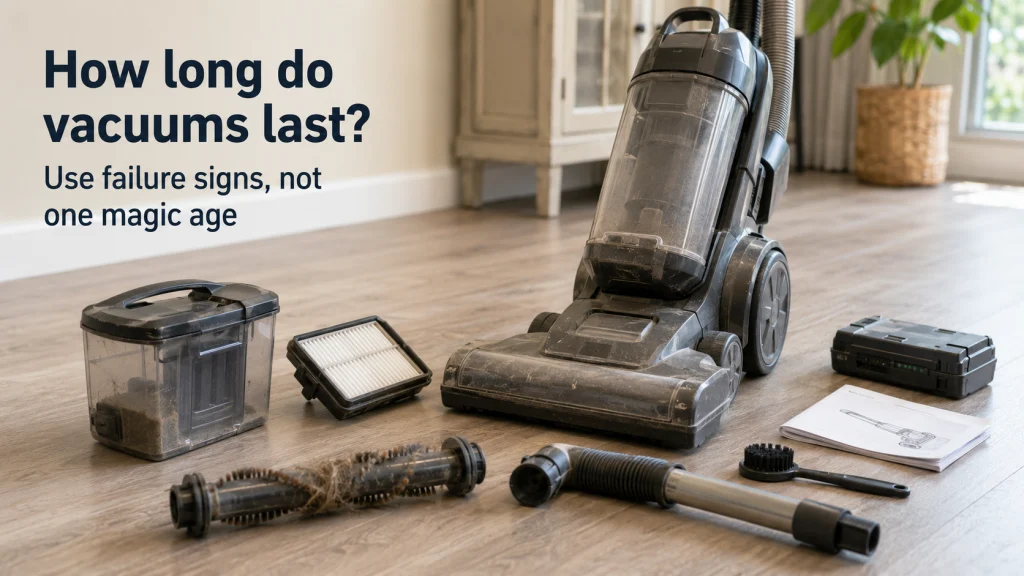
Start with the machine in front of you, not its birthday
If you are asking, “How long do vacuums last?”, the most useful answer is that condition matters more than age by itself. A vacuum that suddenly loses pickup after the bin fills, a filter loads with dust, or hair wraps around the brush roll may be asking for maintenance rather than retirement. On the other hand, a machine that repeatedly overheats, smells electrically hot, cuts out after basic airflow checks, or has a damaged power cord has moved into a different decision. The first step is therefore not to count years, but to identify what changed and whether the symptom belongs to normal ownership or safe service.
This matters because two vacuums of the same age can have completely different histories. One may have cleaned a small hard-floor apartment once a week, while another may have handled pet hair, carpet, stairs, and frequent whole-house cleaning. Storage conditions, filter care, bag or bin habits, brush-roll maintenance, impacts, and battery heat exposure can all change how quickly parts wear. A useful vacuum cleaner lifespan estimate must leave room for those differences instead of treating every machine as if it lived the same life.

The RIDGID VT2534 kit includes a 10-foot dual-layer hose, crevice tool, soft dusting brush, stiff scrubbing brush, hose adapter, and claw nozzle. It is designed for compatible RIDGID wet/dry vacuums with a 1-1/4-inch connection. The kit extends a serviceable vacuum's reach for detailed cleaning without replacing the machine itself.
Check On AmazonIf you click this link and buy, we earn a commission at no additional cost to you.
Why there is no single lifespan for every vacuum design
Uprights, canisters, and cordless sticks do not age through exactly the same weak points. A corded machine can remain mechanically useful for a long time if its airflow path, brush system, hose, seals, switches, and motor remain sound and parts stay available. A cordless machine adds a battery pack, charging system, and power-management electronics that can change the ownership decision even when the suction motor and cleaner head still work well. Architecture does not tell you the exact retirement age, but it does tell you which components deserve more attention.
That is why broad lifespan ranges should be treated as context rather than a countdown. Usage intensity, debris load, filter maintenance, floor resistance, heat, battery cycles, and parts availability can move the real outcome in either direction. A lightly used machine with replaceable wear parts may outlast a harder-working vacuum that has seen better maintenance on paper. What matters is whether the machine can still clean reliably, safely, and economically enough for the household that owns it.
Why the estimate is uncertain: vacuum type changes the likely wear points, but maintenance history, workload, serviceability, battery design, and parts support still determine whether the whole machine is near the end of useful life.
The practical takeaway is simple: use the architecture to know what can age, then use actual symptoms to decide what has aged. That keeps you from replacing a solid corded vacuum because of a generic average, and it also keeps you from treating a weak cordless battery as proof that every other component is finished. It also tells you which parts-support questions matter before you approve a repair. If your larger question is which formats fit different homes and cleaning routines, the overview of types of vacuum cleaners puts those design differences in a broader ownership context.

This Shop-Vac kit includes one flexible crevice tool and one soft-bristle brush, both sized for 1-1/4-inch hose ends. The flexible nozzle reaches narrow spaces, while the soft brush handles fine dust on more delicate surfaces. Check the hose diameter before ordering because the attachments are designed around a 1-1/4-inch connection.
Check On AmazonIf you click this link and buy, we earn a commission at no additional cost to you.
Treat the familiar eight-year figure as historical context
The widely repeated claim that vacuums lasted a median of eight years comes from Consumer Reports reliability reporting published in the mid-2010s. That makes it useful as historical context, not a current rule for every upright, canister, cordless stick, and other household design. The market now includes far more battery-powered machines, different electronics, different service models, and more variation in whether batteries and wear parts are easy to replace. Repeating the old median without its original timeframe creates false precision.
Current lifespan articles also show how broad the estimates become once vacuum type is separated, which is another reason not to turn one average into a replacement trigger. The more useful interpretation is that a well-maintained vacuum can remain serviceable for years, but the useful life ends when condition, safety, parts support, and repair economics stop making sense together. A household should not replace a functioning machine merely because it crossed a remembered average. It should also not keep pouring money into a machine with several serious failures just because it has not reached that average.
Rule out normal maintenance problems before calling the vacuum worn out
Loss of suction is one of the easiest symptoms to misread as old age. A full bag or bin, clogged filter, blocked hose, restricted wand, packed floorhead, or brush roll wrapped with hair can all reduce cleaning performance without proving that the motor is failing. The same is true of some whistles, pulsing behavior, and intermittent shutdowns, because restricted airflow can make a vacuum run hotter or trigger protective behavior on certain models. Start with the checks the manufacturer identifies as owner-accessible before deciding that weak performance is permanent.
The exact cleaning method still depends on the model, especially for filters that may be washable, replace-only, or installed in more than one stage. Do not rinse a filter simply because another vacuum uses a washable one, and do not open motor housings to chase a suspected clog. If routine maintenance is the likely cause, the safer path is to follow the manual for the collection system, filters, brush roll, hose, and accessible airways. For a fuller owner-level process, use the separate article on how to clean a vacuum cleaner rather than turning a lifespan check into a repair project.
| Symptom | First owner-level check | What the result means |
|---|---|---|
| Weak pickup | Check bag or bin level, filters, hose, wand, floorhead, and brush roll according to the manual. | If performance returns, age was not the main problem. |
| Frequent clogging | Clear accessible airways and check whether the vacuum is being used for debris it is not designed to handle. | Repeated clogs after correct use can point to wear, damage, or a poor fit for the household workload. |
| Unexpected shutdown | Stop use, let the machine cool, then check the manual’s airflow and filter troubleshooting steps. | If shutdowns continue after correct maintenance, move to support or service rather than repeated testing. |
| Brush stops or sounds strained | Turn the machine off, disconnect power, and remove accessible wrapped debris only as the manual permits. | If the brush system still binds or makes abnormal mechanical noise, service may be needed. |
A short maintenance pass is valuable because it prevents two expensive mistakes at once. It can save a vacuum that is fundamentally healthy, and it can also reveal that the problem returns immediately even after the easy causes are removed. That second result is important evidence for the service-versus-replace decision. Maintenance is not supposed to become an endless cycle of clearing the same fault every few uses.
Know which symptoms should stop owner troubleshooting
Some signs should change the question from “Can I keep cleaning?” to “Should this be inspected before I use it again?” A persistent burning smell, smoke, sparks, exposed wiring, a damaged cord or plug, melting, overheating that keeps returning, or abnormal mechanical grinding should not be treated as routine maintenance. The same applies when a battery is swollen, physically damaged, unusually hot, or behaving in a way the manufacturer identifies as unsafe. These symptoms do not become acceptable just because the vacuum still turns on. Stop using the machine and follow the exact model’s support or service instructions instead of trying to reach internal electrical or battery components.
Repeated shutdowns deserve similar caution when basic owner-level checks no longer change the behavior. A blocked filter or airway can sometimes cause protective shutdown, but a machine that continues to cut out after the documented checks may have a fault that cannot be identified safely from the outside. Continued trial runs can add heat without adding useful information. At that point, serviceability, warranty status, and the condition of the rest of the vacuum matter more than another round of DIY diagnosis.
Stop-use condition: burning odor, smoke, sparks, damaged cords, exposed wiring, damaged batteries, uncontrolled operation, or repeated overheating belong with qualified service or manufacturer support, not internal owner repair.
This boundary also keeps a lifespan article from turning into a repair manual. The goal is to decide whether the machine still deserves maintenance, professional attention, or replacement, not to diagnose a motor, battery pack, switch, or control board from the outside. Once a symptom crosses the electrical or internal mechanical boundary, the safest evidence comes from the exact manual and service channel. That service response can then become part of the replacement decision.

The Kidde FA110G is a multipurpose extinguisher for common household fires involving ordinary combustibles, flammable liquids, gases, and electrical equipment. It uses an aluminum cylinder, an easy-to-read pressure indicator, and an included mounting bracket. The unit is UL listed and carries a six-year limited manufacturer warranty.
Check On AmazonIf you click this link and buy, we earn a commission at no additional cost to you.
Treat cordless battery aging separately from whole-machine failure
Cordless vacuums make lifespan discussions messy because the battery can age faster than the rest of the machine. Shorter runtime, inability to hold charge, or abrupt power loss may point to the battery or charging system rather than a worn-out suction motor, damaged floorhead, or failed structure. If the exact model uses a replaceable battery and the rest of the vacuum still cleans well, a battery replacement can extend useful life without replacing the whole machine. That only makes sense when the correct battery is available, supported, and reasonably priced for that model.
The opposite case is a cordless vacuum with weak runtime plus other problems, such as worn seals, a damaged cleaner head, unreliable controls, cracked housings, or unavailable parts. Replacing one battery in a machine with several independent failures can turn into sunk-cost ownership rather than a sensible repair. Battery condition therefore belongs in its own line of the decision, not as automatic proof that the entire vacuum has reached the end. Check whether the battery is the isolated failure or merely one item on a growing list.

This lithium-ion replacement battery is designed for specified Dyson V8 Animal, Absolute, Fluffy, Motorhead, and SV10 models. The package includes one battery, a dust cover, screwdriver, three screws, one pre-filter, and one post-filter. Confirm your exact V8 model before ordering because battery compatibility is model-specific.
Check On AmazonIf you click this link and buy, we earn a commission at no additional cost to you.
Compare repair value without inventing one universal dollar cutoff
There is no single repair-cost percentage that works for every vacuum. A modest repair on a sturdy machine with good parts support and no other major wear may be easy to justify, while the same bill on a low-cost vacuum with several aging components may not be. Warranty coverage can change the equation again, because a failure that looks expensive at retail cost may be handled under the manufacturer’s terms. Parts availability, service access, and the machine’s remaining condition are therefore as important as the quoted repair price.
Think in terms of what the repair actually buys you. If one replaceable component restores a vacuum that still has strong pickup, sound structure, intact wiring, and a useful fit for your home, the repair may preserve a machine you already know how to store and maintain. If the quote addresses only one problem while the battery, brush system, hose, seals, controls, or housing are also failing, replacement becomes easier to justify. The goal is not to rescue every old machine or discard every imperfect one, but to avoid paying repeatedly for a vacuum that is becoming unreliable as a system.
- Check warranty first: do not pay for a repair before confirming whether the fault is covered.
- Check parts support: a theoretically simple repair is less useful when the required part is unavailable.
- Check the rest of the machine: one isolated failure is different from several independent wear problems.
- Check household fit: repairing a vacuum you already dislike for weight, storage, noise, or cleaning workflow may not be the best use of the money.
That last point is easy to overlook because repair decisions are often framed as pure math. A vacuum can be mechanically repairable and still be a poor fit for the household that now owns it. If your floor mix, stairs, storage, pets, mobility needs, or cleaning frequency have changed, replacement may solve a fit problem as well as a reliability problem. Those factors should be explicit rather than smuggled into a vague claim that a newer vacuum is automatically better.

Four replacement belts are designed for compatible Bissell vacuums using Style 7, 9, or 10 belts and part number 3031120. The pack provides replacement drive belts when the brush system needs a supported wear part. Confirm the exact vacuum model and belt specification before installation.
Check On AmazonIf you click this link and buy, we earn a commission at no additional cost to you.
Use three outcomes: maintain, seek service, or replace
The cleanest way to decide when to replace a vacuum is to stop treating every symptom as a yes-or-no verdict. A maintenance outcome fits when the problem is owner-accessible, the manual provides a clear procedure, and the machine returns to normal afterward. A service outcome fits when the vacuum has an internal, electrical, battery, repeated-overheating, or abnormal mechanical issue that is not safe or practical to diagnose at home. Replacement fits when safe repairs are unavailable, uneconomical for the machine’s overall condition, or followed by too many other failures.
Use the whole pattern rather than one dramatic moment. A single clog on an older vacuum can be trivial, while repeated overheating on a newer machine can be serious. A weak cordless battery with straightforward replacement support is different from a weak battery plus a damaged head and unreliable charging. The machine earns its next step by the combination of symptom, fixability, safety, parts support, and remaining usefulness.
- Start with safety.
- If there is a burning odor, smoke, sparks, damaged wiring, battery damage, repeated overheating, or abnormal mechanical grinding, stop using the vacuum and move to manufacturer support or qualified service.
- If there is no stop-use sign, continue to the owner-level maintenance check.
- Check documented owner-level maintenance.
- If clearing the collection system, filters, brush area, hose, wand, or other manual-approved airflow path restores normal operation, maintain the vacuum and keep using it.
- If the symptom remains or quickly returns after the correct checks, move to serviceability rather than repeating the same maintenance indefinitely.
- Check whether service restores a sound machine.
- If the fault is isolated, the correct part or service is available, warranty support applies, or the rest of the vacuum remains in good condition, seek service.
- If parts or service are unavailable, several independent systems are failing, or one repair would leave a machine with poor remaining condition, replace it.
This decision sequence also gives you a better answer than a generic age chart because it works for both old and relatively new machines. It forces the problem to prove what it is before money is spent. If a vacuum lands in the replacement outcome, the next question is no longer how old it is but what design now fits the household better. That is the point where shopping information becomes relevant.
If replacement is justified, shop for the problem you actually had
A failed vacuum can teach you more than its age. Within home cleaning appliances, the replacement decision should start with the problem the old machine actually created. If the old machine was constantly clogged by the household’s debris, awkward on stairs, too heavy to move, short on runtime, difficult to store, or expensive to keep supplied with parts and filters, replacing it with the same ownership pattern may simply restart the cycle. Write down what failed mechanically and what frustrated you even when the vacuum was working correctly. Those are two separate lists, and both should influence the next purchase.
Start by deciding whether you need a different vacuum type, then compare current options only after the replacement decision is settled. The page on types of vacuum cleaners helps with architecture and household fit, while the current vacuum cleaner recommendations are the next step if you are ready to compare what is on the market. That separation keeps a lifespan question from turning into a premature shopping pitch. Repair first when repair still makes sense, and shop only when the condition of the machine has earned that conclusion.
Final thoughts: replace on condition and serviceability, not age alone
A vacuum does not become obsolete because it reaches one remembered age. If cleaning the collection system, filters, brush area, and accessible airways restores normal performance, the machine has given you a strong reason to keep it. If the same problem returns, or the symptom involves burning odor, damaged electrical parts, battery damage, repeated overheating, or abnormal mechanical noise, stop treating it as routine maintenance. Serviceability and safety now matter more than the calendar.
The strongest replacement case appears when several things line up: the vacuum no longer cleans reliably, the fault is not an owner-level maintenance issue, parts or service are poor, and the remaining machine does not justify the cost or effort. That is a much more useful standard than asking whether every vacuum should last the same number of years. Maintain what is maintainable, seek service where the safety boundary requires it, and replace when the machine as a whole no longer earns another repair. That decision respects both your budget and the equipment already in your home.
FAQs
🧹 How long do vacuum cleaners last?
There is no reliable universal lifespan for every vacuum type. Use age as background information, then judge maintenance history, symptoms, battery condition, parts support, and whether the machine still cleans safely and reliably.
🔧 Is it worth repairing an old vacuum?
Often, if the problem is isolated and the rest of the vacuum is in good condition. Check warranty, parts availability, service cost, and whether other components are also failing before spending on the repair.
🔋 Does a weak cordless battery mean I need a new vacuum?
Not necessarily. If the exact model supports a correct replacement battery and the rest of the machine works well, replacing the battery may be enough.
🌬️ Why is my older vacuum losing suction?
Start with the bag or bin, filters, hose, wand, floorhead, and brush roll according to the manual. If airflow maintenance does not restore performance, the problem may need service rather than more cleaning.
🔥 Should I keep using a vacuum that smells like it is burning?
No. Turn it off and follow the manufacturer’s support or service instructions, especially if the smell is electrical, the machine overheats, or you see smoke, melting, sparks, or wiring damage.
References and sources
- WIRED vacuum lifespan analysis: supports the symptom-first approach and explains why older averages do not map cleanly to newer vacuum designs.
- Consumer Reports reliability guidance: documents the mid-2010s median-lifespan figure and the maintenance checks commonly cited with it.